Media library intelligence

MediaLyze

Understand your movie, series, and music libraries with fast scans, duplicate insight, quality metrics, and practical dashboards built for large local collections.

What it does

Built for people who maintain serious media libraries.

Scan at scale

Analyze large folders with configurable workers, scheduled scans, and clear readiness states.

Local-first analysis

Keep file paths, media names, and scan diagnostics on your own machine while still getting practical insights.

Movies, shows, and music

Handle video and audio libraries with context-aware tables, filters, metrics, and metadata views.

Folder recognition

Classify shows, seasons, episodes, and bonus content with configurable folder and pattern rules.

Triage duplicates

Find duplicate candidates, review groups, and keep intentional duplicates out of the normal workflow.

History and scheduling

Track library changes over time and run manual, daily, interval-based, or watch-style scans.

Custom dashboards

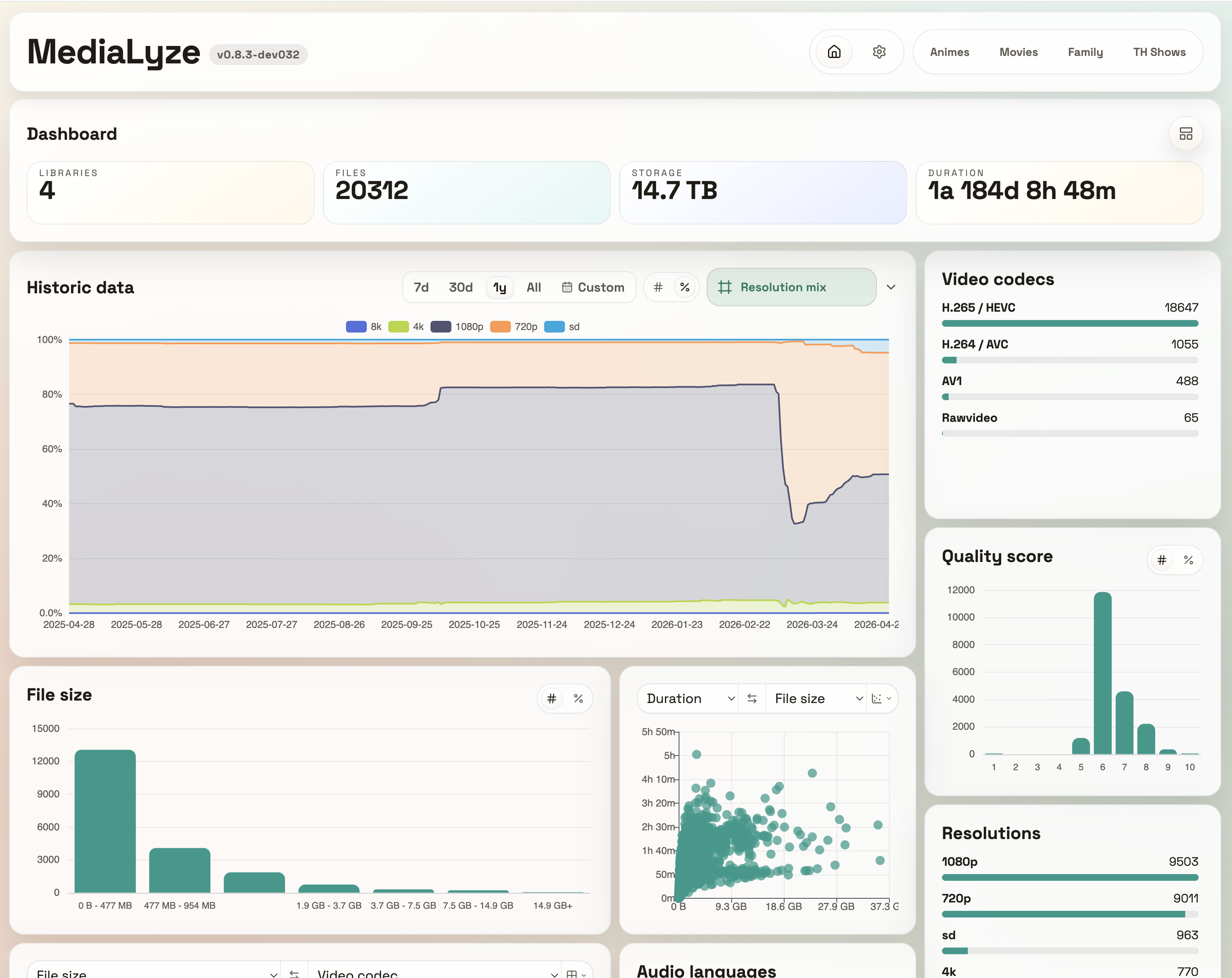
Arrange statistic panels, compare metrics, and keep the views that matter most for each library.

Quality scoring

Spot weak encodes, bitrate outliers, spatial audio, HDR formats, and codec mixes before cleanup work piles up.

Docker and desktop

Run MediaLyze on a server, NAS, or desktop with packaging designed for everyday local media workflows.

MediaLyze in use

Shared telemetry

A quick look at the growing installation base and the scale of libraries being analyzed.

View public stats
Installations0
Active instances0
Files analyzed>0
Storage analyzed>0 GB

Planned in the open

Roadmap

Working On

  • More music metadata
  • Audiobook support

Planned

  • Onboarding process
  • Improved multi-folder mounting
  • More UI languages
  • Hardware compatibility profiles
  • Notification system

Backlog

  • Availability in app stores (Unraid, …)
  • API connection to Jellyfin and Plex
  • API connection to parts of the Arr stack

In the next version

✨ New

  • add a table-based coverage for library modes, scan behavior, supported extensions/formats/codecs/HDR/subtitle handling, and unsupported-input behavior in docs/supported_metadata.md

🐛 Bug fixes

  • allow creating multiple libraries that share the same root path when they use different selected subdirectories (scan_config.selected_paths), and migrate existing SQLite databases to drop the legacy unique constraint on libraries.path (#132)
  • split HEVC / H.265 codec statistics into bit-depth buckets (8-bit, 10-bit, unknown/other) so SDR 10-bit content is no longer grouped ambiguously, and add legacy-safe SQLite migration support for persisted video stream bit depth (#129)
View issues

Latest updates

Changelog

v0.11.0

✨ New

  • add the public MediaLyze website
  • add a donation link to the release-notes dialog that opens the project's GitHub Sponsors page
  • add ROADMAP.md
  • add a shared telemetry mode toggle to the Telemetry settings panel and release-history dialog, backed by persisted app settings and lockable via MEDIALYZE_TELEMETRY_DISABLED
  • add telemetry payload preview support with minimal and enabled modes
  • return the persisted telemetry installation id in app settings so users can later identify their anonymous installation for download or deletion

🐛 Bug fixes

  • move the folder & pattern recognition header tooltip to the left of the collapse button
  • match the settings history reconstruction button sizing to the full-scan action button
  • fix lagging toggle animation in most menus
v0.10.4

✨ New

  • allow duplicate groups to be marked as not duplicates so they stay hidden from normal duplicate views while remaining restorable from the duplicates panel
  • add a dashboard history metric that shows each visible library's file-count share over time
  • add a Windows scripts/dev-local.ps1 helper that mirrors the existing local realtime development startup flow by booting the reloading backend, waiting for /api/health, and then launching the frontend dev server

🐛 Bug fixes

  • harden Windows desktop GitHub Actions builds by retrying the Electron packaging step when upstream electron-builder NSIS resource downloads fail transiently with HTTP 502 responses
  • regenerate favicon and Apple touch PNG assets from the vector source at their native target sizes so higher-resolution icons no longer appear pixelated
v0.10.3

🐛 Bug fixes

  • replace the Linux desktop AppImage ffprobe bundle with a pinned static ffprobe build so media scans no longer depend on host or bundled FFmpeg shared-library resolution; FFPROBE_PATH remains available for explicit system ffprobe overrides (#127)
v0.10.2

🐛 Bug fixes

  • route packaged Linux desktop analysis through a bundled ffprobe launcher that sets its own library path before executing ffprobe, preventing AppImage scans from falling back to incompatible host FFmpeg libraries; FFPROBE_PATH still supports explicit system ffprobe overrides (#127)
  • make MediaLyze.AppImage --version print the packaged desktop app version so users can verify the exact AppImage build they are running (#127)
v0.10.1

🐛 Bug fixes

  • bundle Linux desktop ffprobe shared-library dependencies into AppImage builds and load them at runtime so scans no longer fail when the host distribution has incompatible FFmpeg library versions (#127)
v0.10.0

✨ New

  • add Music library type and basic audio-file support for .mp3, .flac, .m4a, .aac, .opus, .wav, and .wma files (#76)
  • extract and persist music-specific metadata tags (title, artist, album, album artist, genre, date, disc, composer) from audio files when scanning
  • make file discovery library-type-aware so Movies and Shows libraries scan only video files, Music libraries scan only audio files, and Mixed/Other libraries scan both
  • filter analyzed-files table columns by library type to hide video-exclusive fields (video codec, resolution, HDR type, bitrate) when viewing Music libraries
  • filter library and dashboard statistic panels as well as comparison axis selectors by effective library types so music-only views hide video-exclusive metrics and fields
  • add richer music-stream metadata extraction and storage for bit depth, bit-rate mode, compression mode, replay gain, replay-gain peak, writing library, and MD5-unencoded payload values
  • make bitrate metrics and sorting/filtering fall back to summed audio-stream bitrate when container bitrate metadata is missing, so pure music libraries populate bitrate views consistently
  • hide subtitle-language, subtitle-codec, subtitle-source, audio-language, and audio-bitrate statistic panels for pure music libraries while keeping the generic bitrate panel visible
  • add a new app feature flag to optionally show quality-score metrics in pure music libraries; by default these metrics remain hidden in music-only contexts
  • rename the music-context audio-codec metric label to Formats & Codecs in library and dashboard views

🐛 Bug fixes

  • fix backend startup failure on Python 3.12 where NormalizedAudioStream dataclass field ordering triggered TypeError: non-default argument 'language' follows default argument, which could prevent Docker containers from starting
v0.9.1

✨ New

  • add stable desktop release asset names so README download links can point at releases/latest/download/... and always fetch the newest published desktop build
  • add a Scheduled scan mode that runs a daily incremental scan at a configurable time of day (HH:MM); the existing interval-based mode is renamed to Time Interval in the UI; a tooltip in the time picker explains that only one scan per 24 hours is currently supported and that the TZ environment variable should be set correctly (#124)
  • allow creating one library from multiple selected directories; MediaLyze stores a shared root internally, scans only the selected directories, and keeps the selected directory names in analyzed file relative paths instead of stripping them away
v0.9.0

✨ New

  • add a folder & pattern recognition settings panel with configurable show/season, bonus-content, and ignore-pattern rules; bonus content can now be excluded from scans or retained as classified bonus media, and Shows/Mixed libraries gain series, season, and episode recognition with tree/detail views (#74) (#47)
  • view changelog when clicking on version number
  • make the pattern-rule sections individually collapsible, link to the pattern documentation from settings, and classify all videos inside recognized season folders as episodes without requiring configurable episode filename regexes
  • add a Folder depth show/season recognition mode with configurable series and season depths, make it the default, and only show regex inputs when the regex mode is selected
  • show a dashboard/library layout migration notice after updates when saved panel layout entries, sizes, or comparison selections cannot be carried over exactly
  • add an in-depth Dolby Vision profiles feature flag that keeps the default UI collapsed to plain Dolby Vision while optionally showing detected profile, compatibility, level, and Profile 7 layer details
  • replace the library rename browser prompt with inline editing in Settings so library name and library type can be changed together from the library card header

🐛 Bug fixes

  • move the header version pill slightly upward so it visually aligns with the app title without changing its size
  • make grouped series table views page by visible top-level rows instead of hidden episodes and lazy-load expanded series details so scrolling stays responsive in large libraries
v0.8.4

✨ New

  • timespan picker for historic data
  • show a version-specific changelog dialog after updates, allow reopening it from the header version pill, and list previous releases from CHANGELOG.md in a collapsed release-history accordion
  • add GitHub repository and issue-report shortcuts to the changelog dialog
  • replace generic panel loading notices with the existing centered pinwheel loading indicator

🐛 Bug fixes

  • preserve customized dashboard and library panel layouts across updates by avoiding automatic default-panel injection and avoiding write-back during layout reads (#118)
  • make the analyzed-files empty state compact and centered instead of showing a large notice box
  • keep the compact empty analyzed-files state stable while search filters are edited, avoiding spinner flicker and layout jumps
  • improve overall app performance
v0.8.3

✨ New

  • default the full-width app shell feature flag to enabled for first-run desktop app installations while still preserving user changes
  • default file-history retention to 30 days and clarify that dashboard/library trend history is retained separately through media library snapshots
  • make media file detail panels use a compact masonry-style layout and add live pointer-drag reordering so panels follow the cursor and surrounding panels animate into place

🐛 Bug fixes

  • remove the stray dark-mode tooltip background behind the resolution badge on the file detail page
  • cache the history storage forecast and refresh it in the background after scans, history maintenance, and on a periodic schedule
  • report scans with unreadable media files as completed with issues instead of failed when the scan itself finished successfully
  • simplify the file detail header by removing the main metric cards, moving size, duration, and quality into badges, and showing the relative path through the title tooltip
  • align the history-retention table row headers with the dark-mode settings design instead of rendering them as bright gray blocks
  • include all recognized video and audio codec options in quality-profile scoring and settings so Opus and other known codecs no longer fall back to neutral scoring
  • reduce post-scan CPU and memory pressure by bounding large statistics/table caches and estimating history-storage sizes without loading every stored JSON snapshot into Python
  • improve large-library responsiveness with lighter scan discovery memory, deferred table counts, cursor-based table paging, persisted table search fields, additional SQLite indexes, and low-priority post-scan cache warmup
v0.8.2

🐛 Bug fixes

  • backfill legacy library-history snapshots with total size, total duration, file-size summaries, and resolution megapixel summaries so the newer history metrics render for older stored data
v0.8.1

✨ New

  • enhance library history panels with additional metrics, display modes, localized labels, and updated reconstruction/statistics support
v0.8.0

✨ New

  • add a per-library dashboard visibility toggle in Settings so selected libraries can be excluded from dashboard totals, distributions, and comparison panels
  • add configurable history retention and storage budgeting for file_history, library_history, and scan_history, including persisted per-file snapshot history, daily library snapshots, oldest-first cleanup, and a new GET /api/history-storage forecast endpoint
  • add approximate history reconstruction from existing media files with live progress, retention-aware limits, and UI guidance for reconstruction accuracy
  • add dashboard and per-library history panels for historical metric trends, with selectable metrics and a compact Historic data dashboard layout panel

🐛 Bug fixes

  • tighten history, duplicate, and analyzed-files panel headers to reduce wasted vertical space and keep controls aligned with existing panel patterns
  • fix for error while sorting for Bitrate in table view #111
v0.7.1

🐛 Bug fixes

  • broaden ffprobe-based spatial-audio detection so additional explicit Atmos metadata variants beyond stream.profile are recognized during analysis; existing libraries may need a full rescan to refresh previously analyzed files (#107)
v0.7.0

✨ New

  • add configurable metric-comparison statistic panels on the dashboard and library detail pages, with two-axis selection, heatmap / scatter / bar renderers, and dedicated comparison API endpoints for direct context such as size versus duration (#102)
  • extend metric-comparison charts with a numeric Resolution - MP axis option, show the active renderer icon directly in the toolbar button, and add an App Settings control for the scatter-plot sample limit (#102)
  • add inline statistic-panel layout editing on the dashboard and per-library detail pages, including a visible Dashboard page title, animated edit controls, add-panel menus, drag-and-drop reordering, per-panel resize controls, and browser-persisted layouts for each page context
  • add curated first-run default layouts for dashboard and library statistic panels, allow intentionally empty saved panel layouts, and add a History restore-default action to the inline layout toolbar
  • add a new unlimited panel size feature flag that removes the current 4-row height cap for dashboard and library statistic panels while still keeping panel width constrained by the underlying 4-column grid
  • simplify the former Library statistics settings block into a Table View section that now only manages analyzed-files table columns and tooltips, while Bitrate and Audio bitrate can also be enabled as table columns

🐛 Bug fixes

  • remount statistic charts when resized smaller so comparison and histogram panels redraw correctly after inline panel-size changes, restore top-aligned list panels, and make newly added statistic panels default to 1x2
  • align dashboard and library statistic layout controls with the existing header-style button design language so Darkmode no longer renders bright low-contrast white action circles
  • bundle macOS desktop ffprobe dependencies into the packaged app and rewrite non-system dylib loader paths so scans no longer fail on machines without the original Homebrew cellar layout
  • make dashboard statistic panels behave as non-interactive read-only summaries again instead of hinting at missing cross-library drill-downs; only scatter points in dashboard comparison panels still open file details (#104)
v0.6.0

✨ New

  • add reusable Apache ECharts histogram panels for Quality score, Runtime, File size, Bitrate, and Audio bitrate in both the dashboard and library statistics, with local count/percent toggles and clickable library bins that apply matching analyzed-files range filters

🐛 Bug fixes

  • extend structured numeric analyzed-files filters to support comma-separated AND ranges such as >=4GB,<8GB, including the new bitrate-based search fields used by the histogram panels
  • include desktop/ffprobe-paths.cjs in packaged Electron app builds and add desktop packaging regression tests so macOS startup no longer fails with Cannot find module './ffprobe-paths.cjs' (#99)
v0.5.0

✨ New

  • add lightweight analyzed-files codec tooltips that lazy-load per-file video, audio, and subtitle stream details, including language, codec, channel layout, and subtitle source metadata, and make table tooltip visibility configurable per statistic column in App Settings (#93)
  • add first-class spatial-audio support for Dolby Atmos and DTS:X, including ffprobe profile detection, analyzed-files filtering and sorting, library statistics, CSV export, and audio tooltip/detail rendering (#94)
  • add container statistics and analyzed-files container filtering, sorting, CSV export, and configurable table/panel visibility for library views (#97)
  • rework the file-detail page so the Format panel renders structured metadata rows instead of raw format JSON, and make all detail panels globally collapsible and reorderable with browser-persisted state
  • allow Container, Spatial audio, Subtitle codecs, and Subtitle sources to be enabled as optional dashboard statistic panels through the existing statistics settings
  • update the default statistics preset for fresh installs to match the expanded dashboard/table layout while preserving already stored statistic settings on upgrades and only appending newly introduced options

🐛 Bug fixes

  • keep analyzed-files tooltips exclusive so opening or scrolling to another table area closes stale codec and score tooltips instead of leaving multiple overlays on screen
  • fix the desktop release build after v0.4.1 by completing strict frontend test app-settings mocks for the new feature flags and replacing the Windows ffprobe bundle step's brittle Chocolatey install with a direct archive download plus retries
  • reanalyze unchanged media files when external subtitle sidecars are added or removed so subtitle statistics and quality scoring stay in sync with internal subtitles (#95)
v0.4.1

✨ New

  • support ! negation and comma-separated AND terms in analyzed-files metadata search filters (#85)
  • add feature flags for a full-width .media-app-shell layout and hiding the analyzed-files quality score meter (#91)
  • add Excel-like drag resizing for analyzed-files table columns, with widths persisted in browser storage (#91)

🐛 Bug fixes

  • show complete audio and subtitle language lists in analyzed-files table cells and truncate them visually with ellipses when a resized column becomes too narrow
v0.4.0

First "rough" implementation for detecting duplicate files. May break desktop install use v0.3.0 if it's not working properly.

✨ New

  • add per-library duplicate detection with off (default), filename, filehash, both modes (#16)
  • view and search through duplicates on library page
  • scan performance tuning in App settings with separate controls for per-scan analysis workers and parallel library scans

🐛 Bug fixes

  • rework scan execution so discovery streams files directly into analysis and duplicate workers, live progress reflects worker completion, and configured worker counts now affect real throughput
  • stop auto-resuming or auto-queuing stale startup jobs, clear pending watchdog debounce requests on cancel, and improve failed scan diagnostics with copyable detailed error payloads
  • tighten the duplicate and library-settings UI by capping visible duplicate variants with internal scrolling, aligning scan controls consistently, and making the dev desktop artifact build manual-only
v0.3.0

🐛 Bug fixes

  • restrict main release publishing to real version bumps so unchanged-version commits no longer try to recreate existing tags and releases
  • allow adding new resolution categories from the settings UI without tripping the backend's immutable-id validation (#71)
  • fix resolution quality-boundary updates in the library quality settings when minimum / ideal values are changed (#72) - by @eivarin
  • keep Windows UNC network-share paths in their normal form for ffprobe so desktop scans analyze files on network shares instead of only listing them
  • lower the default resolution-category minimum width and height thresholds by 5% so cropped widescreen encodes stay in their expected buckets, and document the relaxed defaults in the settings tooltip (#79)
  • make desktop packaging always create the bundled backend/ffprobe structure, auto-detect ffprobe on the build machine, and use more robust packaged-path fallbacks at runtime before failing (#80)
  • treat NAS snapshot symlink loops under MEDIA_ROOT as invalid paths so browse and library setup return 400 or skip the entry instead of crashing with a 500 (#81)
v0.2.5

✨ New

  • The browser now renders scan and library times in the user's local timezone

🐛 Bug fixes

  • serialize API timestamps as explicit UTC Z values and restore SQLite datetime fields as UTC (#66)
  • align clickable statistics with table - counted streams instead of files (#67)
v0.2.4

✨ New

  • feat: global, configurable resolution categories in App Settings
  • feat: backend now uses the shared resolution-category configuration

🐛 Bug fixes

  • show scan banner earlier through better polling
  • lower default resolution-category minimum heights so cinema-scope and letterboxed releases still map to the expected width-based buckets
v0.2.3

✨ New

  • feat: native Electron-based desktop app
  • github: release workflows for Windows, macOS and Linux
  • github: Docker images for linux/amd64 & linux/arm64 - by @patrickjmcd
  • feat: Add */.deletedByTMM/* default ignore pattern for Tiny Media Manager users

🐛 Bug fixes

  • various bug related to desktop distribution

📚 Documentation

  • local desktop build and packaging documentation
  • expanded README with desktop setup, runtime behavior, and desktop deployment details

New Contributors

@patrickjmcd in #57

v0.2.2

✨ New

  • Added clickable library statistic counts so matching analyzed-files table filters can be applied directly from the Library detail page
  • Added CSV export for the full analyzed-files result set, including the active filters and sort order in the exported file header
  • Added a feature flag for the analyzed-files CSV export button, disabled by default and positioned below the title on smaller screens
  • Expanded HDR10+ detection so more ffprobe metadata variants are recognized during analysis

🐛 Bug fixes

  • Closed the metadata search picker immediately after choosing a filter, so it no longer stays open until an extra outside click
  • Replaced existing analyzed-files metadata values when a new statistic filter from the same category is selected, instead of duplicating the search field
  • Improved the scan-log failures UI so failed files stay readable and show their analysis error on demand
  • Hid container placeholder directories like cdrom, floppy, and usb in the path browser while keeping explicit mounted media paths visible

📚 Documentation

  • Refreshed the README with current screenshots, updated project-status copy, and a star-history chart
  • Reworked AGENTS.md to document the actual current dev branch behavior, release chronology, runtime architecture, and repository layout
v0.2.0

✨ New

  • Added detailed scan logs with recent-job history with rich details
  • Collapsible settings panels

🐛 Bug fixes

  • Hid nested mount points and symlinks outside MEDIA_ROOT in the path browser so multi-directory Docker setups no longer expose invalid library targets
  • Fixed visual-density scoring to accept both , and . decimals, support an explicit maximum threshold, and use actual file size to penalize bloated media even when bitrate metadata is misleading
  • Fixed incremental scans to reanalyze files with incomplete metadata, remove files that became ignored or disappeared, and preserve short actionable ffprobe failure reasons in stored scan summaries
v0.1.3

✨ New

  • @MSCodeDev added a color theme setting with System, Light, and Dark modes, including persistent browser-side preference storage and automatic OS theme following in System mode.
  • Tightened the analyzed-files table layout so audio language and subtitle language columns use less horizontal space.

New Contributors

@MSCodeDev in #40

v0.1.2

✨ New

  • Added a new Feature flags section under App settings.
  • Added the Show Dolby Vision Profiles feature flag so Dolby Vision profile variants can be shown separately in Dynamic Range statistics and metadata views when explicitly enabled
  • Added Dolby Vision profile extraction during ffprobe parsing for new scans, storing values like Dolby Vision Profile 5/7/8 instead of only the generic Dolby Vision label
  • Added a rescan tooltip for the Dolby Vision profile feature flag to clarify that installations used before v0.1.1 may need a fresh scan

🐛 Bug fixes

  • Preserved quality-score dynamic range normalization so stored Dolby Vision profile variants still map to the existing Dolby Vision quality tier
v0.1.1

✨ New

  • Added official GitHub release support with tag-driven publishing and curated release notes
  • Added a release metadata validation script to keep Docker, backend, and frontend versions aligned
  • Added release PR validation in GitHub Actions so version and changelog mismatches fail before merge

🐛 Bug fixes

  • Switched official Docker publishing for main from branch-triggered builds to SemVer tag releases
  • Updated the dev image workflow to derive its base version from Git tags instead of GHCR package APIs
  • Normalized the repository version metadata to 0.1.1 ahead of the first official public release
v0.1.0

✨ New

🐛 Bug fixes

take a look

Screenshots